A guide from the app’s developer
A vocabulary session in Lexora: learn, answer, review
A word can look familiar without being easy to use. In Lexora - SAT Prep, try taking one word through its meaning, an example, and an answer from memory. Then let the review schedule bring it back so you can find out what stayed with you.
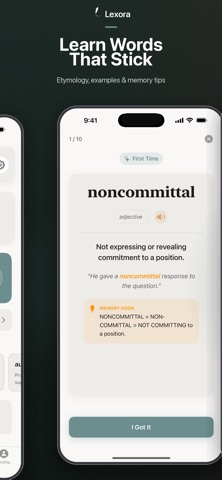
Work through one word carefully
- Start a study session. Choose an unfamiliar word from the words presented. Read its definition before rushing to the answer.
- Read the example for context. Ask what the word contributes to the sentence. Try replacing it with a simpler phrase and see whether the meaning stays the same.
- Hear and say the word. Use pronunciation, then say it aloud if that helps. The sound gives you another way to recognize it when reading or speaking.
- Make the memory tip personal. Read the etymology or memory hook, and edit the tip when you have a clearer connection. A useful tip should help you recover the meaning, not just remember how the letters look.
- Answer before looking back. Use the prompt presented in the session. If you need a hint, use it, then notice what you still could not recall.
- Return for scheduled review. Let the selected learning engine manage the next review. Answer honestly so the app has a useful record of what you remembered.
Try “noncommittal”
The published word card on this page shows noncommittal. Imagine asking someone whether they will join a trip and getting an answer that avoids a clear yes or no. Describe the answer in your own words, then use the vocabulary word in a sentence of your own.
Now change the situation: someone states a firm preference. Does the word still fit? Comparing a fitting and an unfitting example helps you check whether you understand the meaning beyond the card.
Use extra practice for a specific problem
Lexora offers practice with studied words, weaker vocabulary, previews of new words and a random five-word quiz. These extra practice sessions do not change the scheduled review plan. Choose one that fits the problem you noticed: a definition you keep mixing up, a word you have not met yet, or a quick check of older words.
Practice can include typed answers, missing-word prompts and multiple choice. A correct choice is useful; being able to explain the word without the options is another check you can do yourself.
Using this alongside GRE vocabulary study
Lexora’s current 3,400+ word bank is curated for SAT vocabulary. Definitions, examples, pronunciation and review can also support broader English word practice. If you are studying for the GRE, pair that work with the GRE’s actual reading and question formats: vocabulary alone is only part of preparation.
ETS explains GRE Verbal Reasoning, including reading comprehension, text completion and sentence equivalence. Use official questions to check meaning in context, alongside word practice.
Try it in Lexora - SAT Prep
iPhone and iPad · iOS / iPadOS 18.0+. Free download with ads and optional Premium subscriptions. Some functions need an internet connection. The App Store shows the current availability and purchase options for your country.
Get Lexora - SAT Prep on the App StoreProduct features and availability were checked against the current App Store listing. See the app overview for more details.