A guide from the app’s developer
Make sand art on your iPhone, then set it moving
A sand picture does not have to stay still. In Drizzl - ASMR Sandbox, you can build a little landscape, cut through it, and tip the whole scene into a different shape. Start with a small pile. That gives you room to notice what one change does.
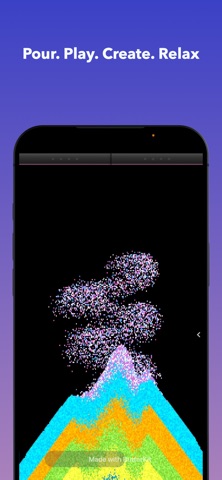
Build a scene you can change
- Start with Sand. Open Mat and choose Sand, then choose a color in Color. Choosing a material or color puts you back in Pour, so you can drag on the canvas to add particles.
- Make three small layers. Pour a short strip, change color, and pour another. Keep some empty space beside the pile. The colored bands make it easier to follow the grains when they move.
- Cut a path through the pile. Open Tool and choose Slice. Drag one line through the sand. Watch the edges settle before making another cut.
- Let gravity change the picture. Switch Gyro to its active mode and tilt your device slowly. Watch the layers slide toward the lower side. You can return Gyro to off when you want gravity pointing down the canvas again.
- Try the same idea with one change. Pour a smaller pile or make a wider cut. See whether the new channel stays open or fills as the sand moves.
Follow one colored layer
Pick a stripe and follow it through the cut. Does it stay together, spread across the surface, or disappear underneath another color? Make one slow tilt, wait for the pile to settle, then tilt back. A small movement often makes the change easier to see than shaking everything at once.
For a different ending, shake the device and watch the arrangement break apart. You can start a new picture from whatever remains. There is no score or finished shape you need to reach.
Make a tiny sand hourglass
Leave a narrow opening beneath a pile and watch the colors take turns through it. Try the same scene with a wider opening. The interesting part is the change in flow: a packed line becomes a trickle, then a rush.
Keep this experiment small enough that you can see the opening. If the cut disappears, make it wider and try again. For a quieter variation, let a thin layer slide and listen to the movement before touching the canvas again.
Listen as the picture moves
Drizzl’s sound responds to particle activity. Listen to a settling pile, then compare it with a longer slide. Haptic feedback is available on supported iPhones; a screenshot or video cannot show what that feels like. You can adjust your play around the visual and audio feedback you enjoy.
Try it in Drizzl - ASMR Sandbox
iPhone and iPad · iOS / iPadOS 17.6+. Free download with ads and optional in-app purchases. The App Store shows the current availability and purchase options for your country.
Get Drizzl - ASMR Sandbox on the App StoreProduct features and availability were checked against the current App Store listing. See the app overview for more details.